
Easiest way to Sub-Out
Sub-Outs unfortunately happen. With the new Sub-Out feature in Casefriend you can easily download all documents and email in their native format (e.g.: .pdf .docx .eml). When complete, the case will be closed with the reason "Sub-Out" and the Sub-Out document package will be added to the Close Event.
Important: The Sub-Out package contains all case documents. You are responsible for reviewing the content of all documents to ensure that no firm or client confidential information is not shared with the new firm.
⚠️Note: This feature is only available to users with permissions managed by your firm manager or administrator. This function will automatically be available to existing firm managers.
How to sub-Out a Case
- Right-click the case you want to sub-out from the Caseload screen and select Download (Sub-Out)
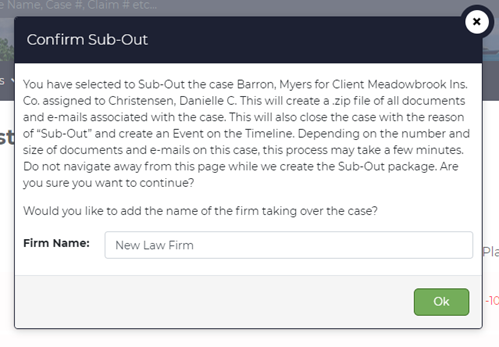
- Review the confirmation screen to ensure you ensure the correct Case is selected. Enter the name of the new Law Firm.
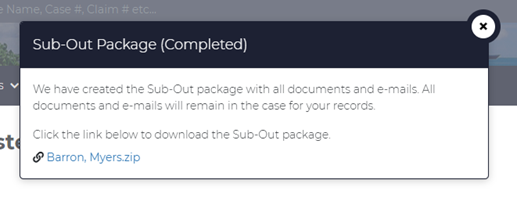
- When your Sub-Out package is completed, you will be prompted to download the .zip file. The Sub-Out package will be preserved in the Close Event on the case for you or your team to access at any time. The Sub-Out action is also recorded in the Case Activity Log
Sub-Out Zip Contents
The Sub-Out .zip file contains:
- Sub-Out Report - a Word file with the Case Information including a list of documents and e-mails exports
- Documents folder - all documents saved to the case
- e-mail folder - all emails saved to the case in .eml format.
Comments
0 comments
Please sign in to leave a comment.