
We’re introducing a new way to track your daily billing activity with the launch of the My Billing panel in The Hopper. This feature replaces the legacy My Billing Portal, offering a more intuitive and streamlined experience for law firm staff and attorneys.
My Billing Panel in The Hopper
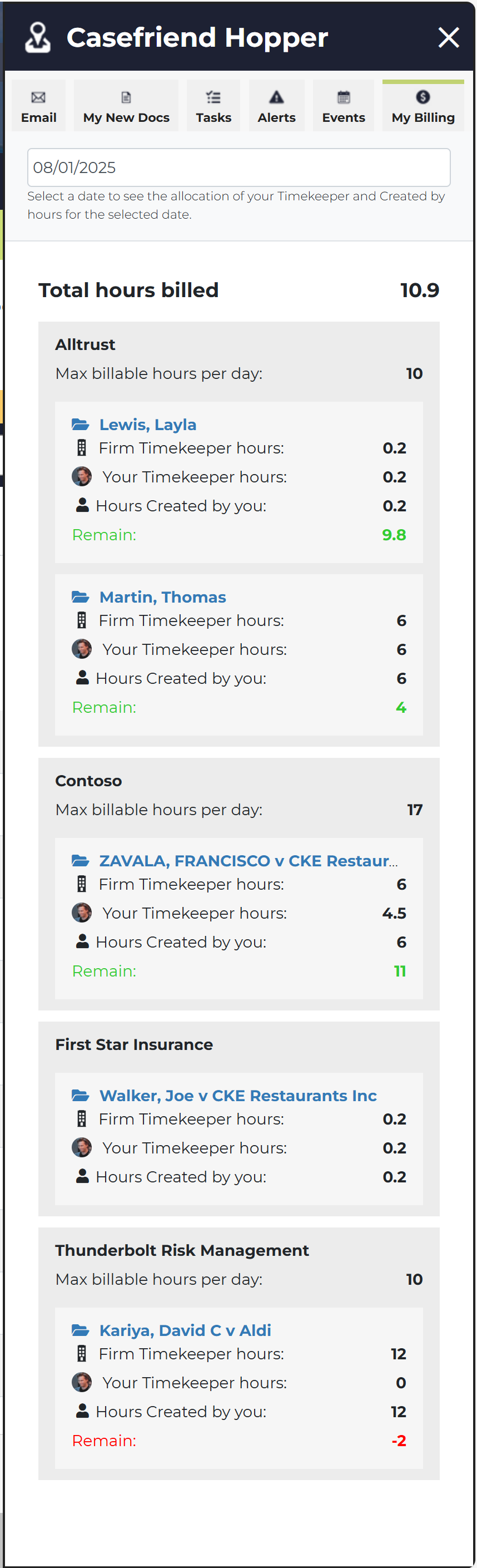 🆕 What’s New
- My Billing Panel Launch
The new panel is now available in The Hopper and will fully replace the My Billing Portal on October 2, 2025. - Daily Time Tracking
By default, the panel displays your current day’s time allocation. Use the date selector to view hours for any other day. - Grouped by Case & Client
Your hours are automatically grouped by Case and Client for easier review and reporting.
📷 [Insert image: My Billing panel interface]
📊 Key Metrics Displayed
- Max Billable Hours per Day
Shows the maximum number of Timekeeper hours allowed per Case, per day (optional setting configured by firm management). - Firm Timekeeper Hours
Total Timekeeper hours billed to the Case across your firm. - Your Timekeeper Hours
Hours where you are assigned as the Timekeeper. - Hours Created By You
Hours where you are listed as the “Created By” user. - Remaining Hours
Displays how many Timekeeper hours are still available to bill on the Case.- ✅ Green = within limit
- ❌ Red = exceeded limit
- Note: Remaining hours only appear when Max Billable Hours are set.
🔍 Quick Access to Time Entries
Click any Case name to view all time entries associated with that Case, helping you stay organized and ensure accurate billing.
This update is designed to give paralegals, attorneys, and support staff better visibility into daily billing activity and help firms stay compliant with client billing limits.
As always, we welcome your feedback—reach out to support@casefriend.com to share your thoughts.
Comments
0 comments
Please sign in to leave a comment.