
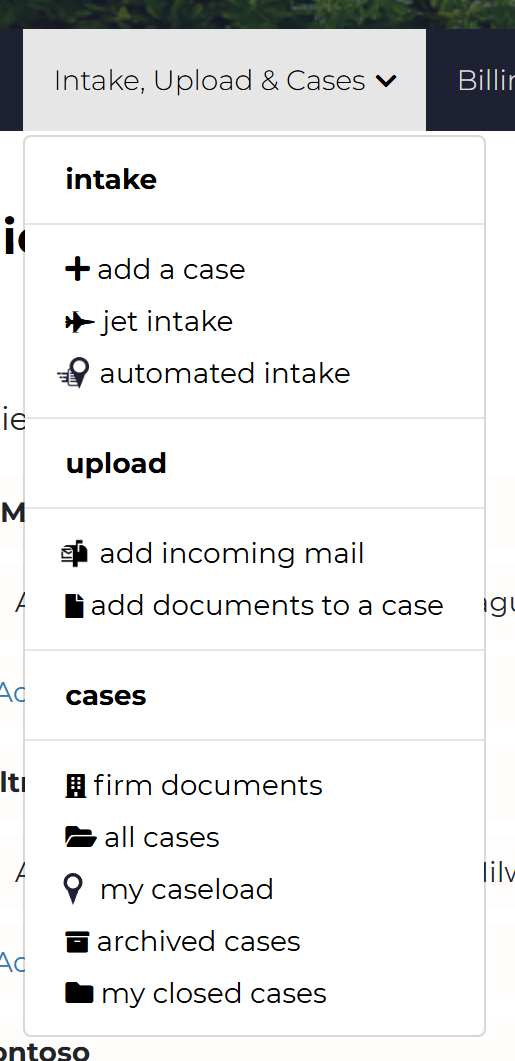
We’ve updated the Cases & Documents menu to better reflect its expanded functionality and make navigation more intuitive for law firm staff. The newly renamed Intake, Upload & Cases menu serves as your launch pad for case creation, document intake, and firm-wide case access.
Intake, Upload & Cases Menu Update
 🆕 What’s New
-
Renamed Menu
The former Cases & Documents menu is now called Intake, Upload & Cases, clearly organizing actions into three categories: case creation, document upload, and case access.
✈️⚙️ Intake Section
- Add a Case – Create a new case manually
- Jet Intake – Launch a Jet Intake job for fast, guided case creation
-
Automated Intake – Start an Automated Intake job to process large PDFs and organize documents automatically
Read more about Case Intake with Casefriend here.
📤 Upload Section
- Add Incoming Mail – Upload scanned mail directly into Casefriend
- Add Documents to a Case – Attach documents to an existing case quickly
Read more about document upload here.
📂 Cases Section
- Firm Documents – Search for documents across your entire firm
- All Cases – View all cases firm-wide
- Open Cases – Access currently active cases
- Archived Cases – Browse archived cases
- All Closed Cases – Review all closed cases
This update is designed to streamline your workflow and make it easier for paralegals, legal assistants, and support staff to find and perform key tasks. As always, we welcome your feedback—reach out to support@casefriend.com to share your thoughts.
Comments
0 comments
Please sign in to leave a comment.